
GQueues: Streamline Tasks in Google Calendar
Overview
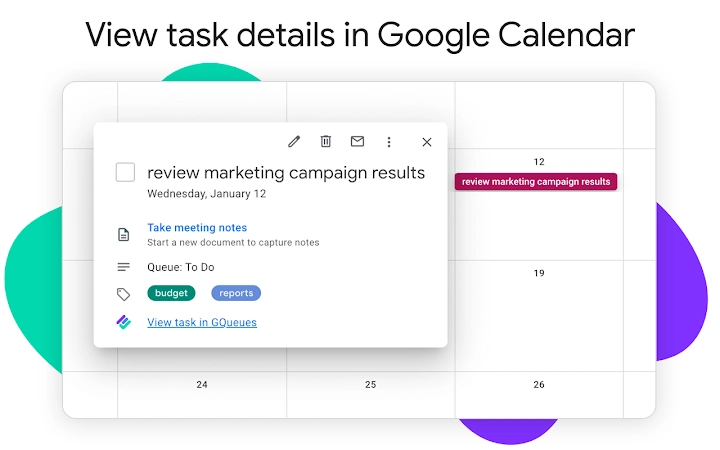
GQueues is a Google-integrated task management tool designed to enhance productivity by bridging the gap between Google Calendar and task tracking. It enables users to view detailed task information and mark tasks as complete directly within the calendar interface, eliminating the need to switch between multiple applications. This seamless integration is particularly beneficial for individuals and teams relying on Gmail and G Suite for daily workflows.
The software targets professionals, remote workers, and team leaders who manage time-sensitive tasks and meetings across shared calendars. By consolidating task visibility and execution into a single environment, GQueues reduces context switching and improves focus. It supports both personal and organizational Google accounts, making it suitable for solo users and collaborative teams alike.
While the developer has not provided additional background details, the tool’s functionality suggests a focus on efficiency and integration with core Google Workspace services. Real-world use cases include scheduling daily check-ins, tracking project milestones, and managing recurring task deadlines—all from within Google Calendar.
Key Features & Capabilities
- Direct Task Management in Calendar – View task details such as due dates, priority levels, and descriptions without leaving Google Calendar. This feature allows users to stay within their primary workspace while managing responsibilities.
- One-Click Task Completion – Mark tasks as complete with a single click, syncing the status across all connected devices and accounts. This reduces manual effort and ensures real-time accuracy in task tracking.
- Google Calendar Integration – Seamlessly connects with Google Calendar to display tasks alongside events, offering a unified view of time and responsibilities.
- Support for Gmail and G Suite Accounts – Compatible with both personal Gmail and enterprise G Suite accounts, enabling consistent task management across different user profiles.
- Real-Time Syncing – Updates are synchronized instantly across devices, ensuring that task status remains consistent regardless of access point.
These features streamline workflows for users managing complex schedules. For example, a project manager can review upcoming deadlines during a team meeting, confirm task completion, and adjust timelines—all within the calendar interface. Similarly, a freelancer can track client deliverables and update progress without opening a separate task app.
User Interface, Workflow & Performance
The user interface of GQueues is designed to complement the existing Google Calendar layout, maintaining a clean and intuitive structure. Navigation is straightforward, with task controls integrated directly into calendar event cards. Users can access task details with a hover or click, depending on the browser settings.
Workflow efficiency is enhanced by minimizing the number of steps required to complete a task. The one-click completion feature reduces friction in daily task management, promoting consistent usage. The software operates as a browser extension, meaning it does not require installation on the operating system itself.
Performance observations are based on general software behavior patterns. The developer did not specify resource usage details. However, given its lightweight design (3.5 MB), it is expected to have minimal impact on browser performance. Stability appears to be consistent with standard browser extensions, though real-world behavior may vary based on user environment and browser configuration.
Compatibility & System Requirements
GQueues is compatible with Windows, Mac, and Linux operating systems, ensuring broad accessibility across desktop platforms. As a browser extension, it operates within modern web browsers such as Chrome, Firefox, and Edge, though specific browser versions were not listed.
The installation size is 3.5 MB, which is relatively small and suitable for users with limited storage. The software does not require additional system resources beyond those provided by the host browser. Exact system requirements were not listed, but its lightweight nature suggests compatibility with standard desktop configurations.
Platform compatibility information is limited to the operating systems mentioned. Users should verify browser compatibility through their respective extension stores.
Pros and Cons
Pros
- Seamless integration with Google Calendar and G Suite
- One-click task completion improves workflow efficiency
- Supports both personal and enterprise Google accounts
- Lightweight at just 3.5 MB
- Free to use with no hidden costs
Cons
- Requires a Google account to function
- Dependent on browser extension support
- No offline task management capability mentioned
- Limited to Google Calendar environment
- Exact performance impact not disclosed
FAQ Section
Is GQueues compatible with all Google accounts?
GQueues supports both personal Gmail accounts and G Suite (now Google Workspace) accounts, making it suitable for individual and team use.
Can I use GQueues offline?
The software requires an active internet connection to sync tasks with Google Calendar. Offline task management is not supported.
How often does GQueues update?
Updates are released by the developer as needed to maintain compatibility with Google Calendar and browser platforms. Specific update frequency was not provided.
Is GQueues secure?
As a browser extension that integrates with Google services, GQueues relies on Google’s authentication and security protocols. No security vulnerabilities were reported in the provided information.
Do I need to pay to use GQueues?
No, GQueues is completely free to download and use. There are no subscription fees or premium tiers available.
Final Thoughts + CTA
GQueues delivers a focused, efficient solution for users seeking to simplify task management within Google Calendar. Its tight integration with Gmail and G Suite makes it a valuable tool for professionals and teams already invested in the Google ecosystem. While it lacks advanced features like offline access or cross-platform desktop apps, its core functionality is reliable and well-executed.
For those who spend significant time in Google Calendar and want to reduce task-switching overhead, GQueues offers a practical and free enhancement. Its lightweight design and zero cost make it accessible to a wide audience.
Download GQueues now







